
Before we get started, make sure you subscribe to this blog and ring that notification bell (if you’re on YouTube). We drop new insights every week to help your vacation rental stand out—and book out.
.
.
How to Use Google Business Profile to Get More Direct Bookings
Want fewer fees, better guests, and more control? Of course you do.
.
Here’s a little secret: the humble Google Business Profile (GBP)—yes, that free listing you’ve probably half-filled out—is actually your #1 untapped tool for driving direct bookings.
.
Stick around, because near the end I’ll share a trick to get guests calling you before they even hit your Airbnb listing.
.
Alright, let’s dive in.
.
.
First, What Is Google Business Profile?
If you’ve ever Googled “best pizza near me,” you’ve seen it. It’s that box on the right side of Google Search or in Google Maps with reviews, photos, a phone number, and a link to the business’s website.
.
That’s Google Business Profile.
.
Now imagine someone Googling “holiday cottage in Taupo” or “pet-friendly rental near Cairns”. With a good profile, they could find you before they find Airbnb. And you’ll save 15–20% on commission.
.
That’s the power of GBP.
.
.
Why Vacation Rental Owners Should Care
Let’s be real. Airbnb and Vrbo are great, but they’re like Airbnb’s house, Airbnb’s rules. You’re just a tenant.
.
Want more control over pricing, availability, and guest expectations? Want to deal with actual humans, not just usernames and ratings? Then you need direct bookings—and GBP is a huge part of that.
Here’s why:
- Free exposure on Google Search and Maps
.
- Your phone number, website, and booking link right there
.
- Reviews that boost your trustworthiness
.
- The ability to show up for “near me” and location-based searches
.
What’s not to love?
.
👉 Quick Fact: Businesses with complete Google profiles get 7x more clicks than incomplete ones. Oof.
Listen to the Vacation Rental Resolutions Podcast for more game-changing tips like this.
.
.
Step 1: Claim and Verify Your Profile
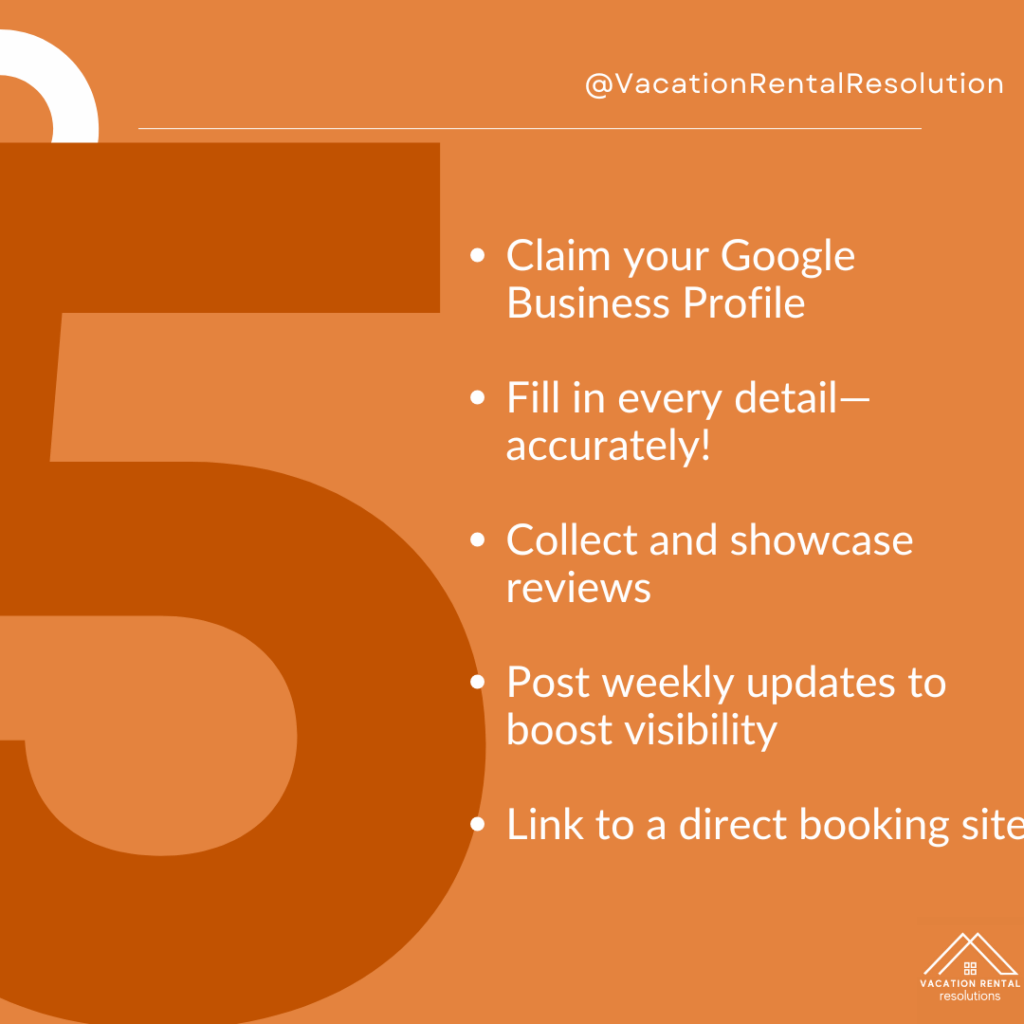
Search your rental’s name on Google. If it pops up, hit “Own this business?” and follow the steps. If not, go to google.com/business and set one up from scratch.
.
Use your property’s actual location (don’t worry—you can hide your address). Choose “Vacation Home Rental” as your business category.
.
Pro tip? Use a business email (like bookings@yourproperty.com) to look more legit.
.
.
Step 2: Nail Your Profile Details
Think of this as your digital curb appeal. Fill out:
- Name (match your website/Facebook name exactly)
.
- Phone number
.
- Direct booking website (if you don’t have one yet, check out our post on that)
.
- Check-in/out hours
.
- High-quality photos (hello, thumbnail-worthy cover image!)
.
💡 HOT TIP: Your description should include keywords people search. Try: “Pet-friendly beachfront holiday home in Noosa” or “Romantic getaway cabin in Queenstown”.
.
📺 Watch & Learn: Subscribe to the Vacation Rental Resolutions YouTube channel for weekly how-tos, walkthroughs, and witty takes on all things rentals.
.
.
Step 3: Ask for (and Show Off) Reviews
GBP reviews help you rank higher in searches. Ask happy guests to leave a review directly on Google—not just Airbnb.
.
Use a follow-up email after checkout. Something like:
.
“We loved hosting you! If you enjoyed your stay, we’d be so grateful if you left a quick Google review. It helps future guests find us—and keeps our small business growing.”
.
Make it easy. Include the review link. Say thank you. Maybe bribe them with a discount code for next time (we won’t tell).
.
.
Step 4: Post Like It’s Instagram
Yup, you can post updates on your GBP just like social media. And yes, people read them.
Try:
- Highlighting seasonal packages
.
- Sharing guest photos (with permission)
.
- Posting last-minute availability
.
Consistency boosts your profile’s visibility.
.
💻 Need help setting all this up? Our “Launch Your First Vacation Rental” course walks you through the tech setup step by step—without the overwhelm.
.
.
Step 5: Connect It to Your Booking Engine
If you’ve got your own booking site, make it easy for guests to click and book directly.
.
Not there yet? Use a free tool like Google’s “Bookings” integration or link to a reliable platform that doesn’t charge insane fees (like Lodgify or Boostly).
.
This is the moment where you stop losing bookings to Airbnb and start keeping more of your revenue.
.
 Hosting should bring joy, not just job lists.
Get the “The 7-Day Vacation Rental Jumpstart” download.
Seven bite-sized steps to a rental guests rave about—without burning out.
Get your copy now! You can find a link in the show notes.
Do you already use Google Business Profile? What results have you seen?
Drop your answer in the comments!
.
Here Are You Key Takeaways
.
In Conclusion
Using your Google Business Profile is like putting up a free billboard on the world’s busiest highway.
.
It’s simple.
.
It’s powerful.
.
And it’s criminally underused by vacation rental owners.
.
Start today, and you’ll attract better guests, pay fewer fees, and regain control of your business.
.
If you want more hands-on guidance, our “Launch Your First Vacation Rental ” course dives deep into these strategies—tech setups, tools, and templates included.
https://courses.keystonehospitalitydevelopment.com/course/mastering-vacation-rentals-build-manage-and-grow-a-profitable-business-full-course/
.
🛏️ Also, check out this related blog post: Unlock The Power Of Your Vacation Rental Website. Episode 20
.
👉 Subscribe for more how-tos, marketing tips, and mindset shifts.
.
☕ Like the content? Buy us a coffee—we run on caffeine and guest reviews.
If your rental plan is ‘just wing it’—this is your wake-up call.
Download the “The 7-Day Vacation Rental Jumpstart”
Vision, money, guests—sorted.
Get your copy!
Sign up now!


A Division of Keystone Hospitality Property Development

Vacation Rental Pricing Strategy: Is Your Nightly Rate Too High or Too Low?-145

Airbnb Operations Management: 5 Systems That Save Time Without Losing Hospitality-144

Vacation Rental SOPs: 5 Systems Every Host Needs-143

Why Original Art Makes Vacation Rentals More Memorable

Vacation Rental Maintenance Checklist: Prevent Guest Complaints and Costly Repairs-142